

XPA server wizard
Once all three software components have been installed:
-
ACM Server
-
CCure 9000 Plugin
-
MIP ACM Plugin
Go to the XProtectEvent Server host server and configure the MIP ACM Plugin. The configuration is performed through a wizard application found in the Windows start menu. The wizard can be found by searching for the program by name: “Milestone ACM Server Wizard”
Launch the wizard and click Next. At the Add an ACM Server step, the ACM Server Address field is required and should be entered as the host name of the CCure 9000 host server.
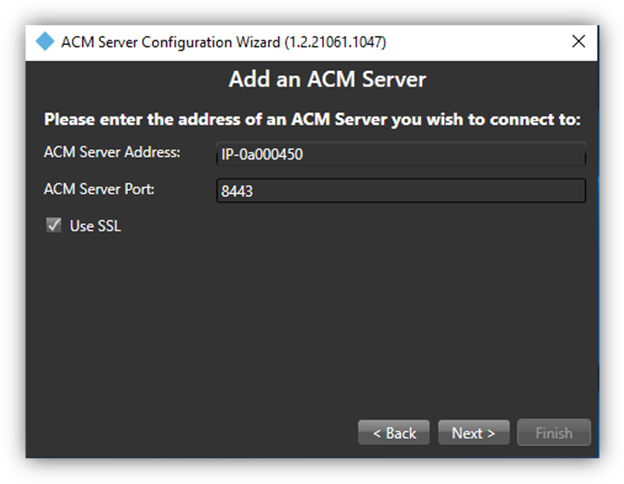
After the wizard validates the ACM Server address, a green checkmark next to the text Connected indicates a successful connection. Select the checkbox next to the plugin that will be installed. The plugin should be named:
-
Tyco-CCure9000-Hostname
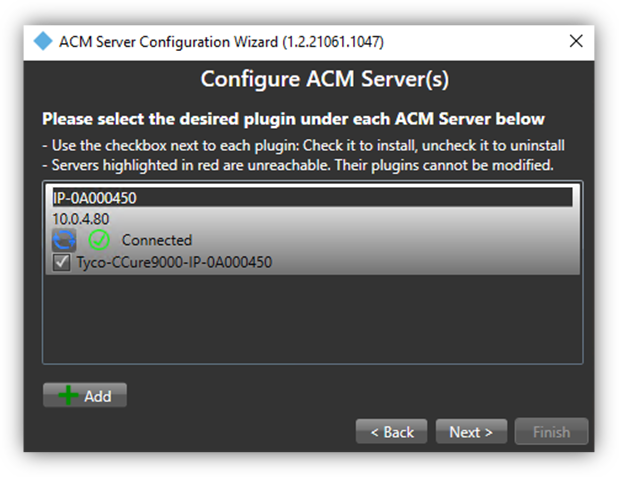
Complete the Milestone ACM Server Wizard to complete the configuration of the MIP ACM Plugin.