Pause rule-based or manual patrolling sessions
If the system administrator has given you PTZ priority permissions, you can pause rule-based patrolling sessions or manual patrolling sessions started by other users.
You can pause a patrolling session if you have a higher PTZ priority than the user or rule currently controlling the camera.
In live mode, select the view item with the relevant PTZ camera.
On the camera toolbar, select PTZ
 to open the PTZ menu.
When the PTZ icon is red, the PTZ camera is patrolling, or another user is manually controlling the camera.
Select Pause patrolling.
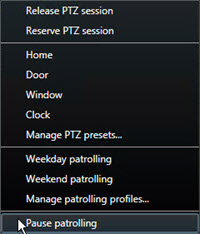
The PTZ icon turns green for you and red for all other XProtect Smart Client users.
Note
Patrolling is no longer paused if you pan, tilt, or zoom with the camera.
To resume the rule-based patrolling again or free the camera so other users can control it, select Pause patrolling.