Log in
Start XProtect Smart Client. The login window is displayed.
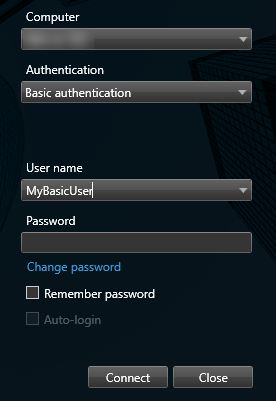
Specify the name or address of the management server that you want to connect to.
Select one of these authentication methods:
Windows authentication (current user)–log in using the Windows user credentials that match your current login.
Windows authentication–log in with Windows user credentials that are different from your currently used Windows user credentials.
Basic authentication–log in as a basic user. Your system administrator defines basic users in XProtect Management Client.
[Name of external IDP]–select this option to log in with an external IDP. See also Log in via an external IDP.
Select Connect.
Note
How long it takes to log in depends on the complexity and configuration of your organization's XProtect VMS system.
A few additional steps and questions might appear depending on the configuration of your XProtect VMS system and product extensions.