Improving your situational awareness
XProtect Smart Client has many built-in features that facilitate your awareness of what is happening in the buildings and areas you protect.
Which features are available to you depends on your organization’s XProtect VMS product and possible extensions, as well as your user permissions.
XProtect Access
With XProtect Access, you can integrate with access control systems and control who can enter your area and buildings from within XProtect Smart Client.
XProtect LPR
XProtect LPR identifies and captures license plate information from vehicles and combines it with the corresponding video. You can compare recognized number plates with predefined lists and initiate automated actions through rules. For example, issuing parking charges and opening gates to allow registered cars to enter an area.
Maps
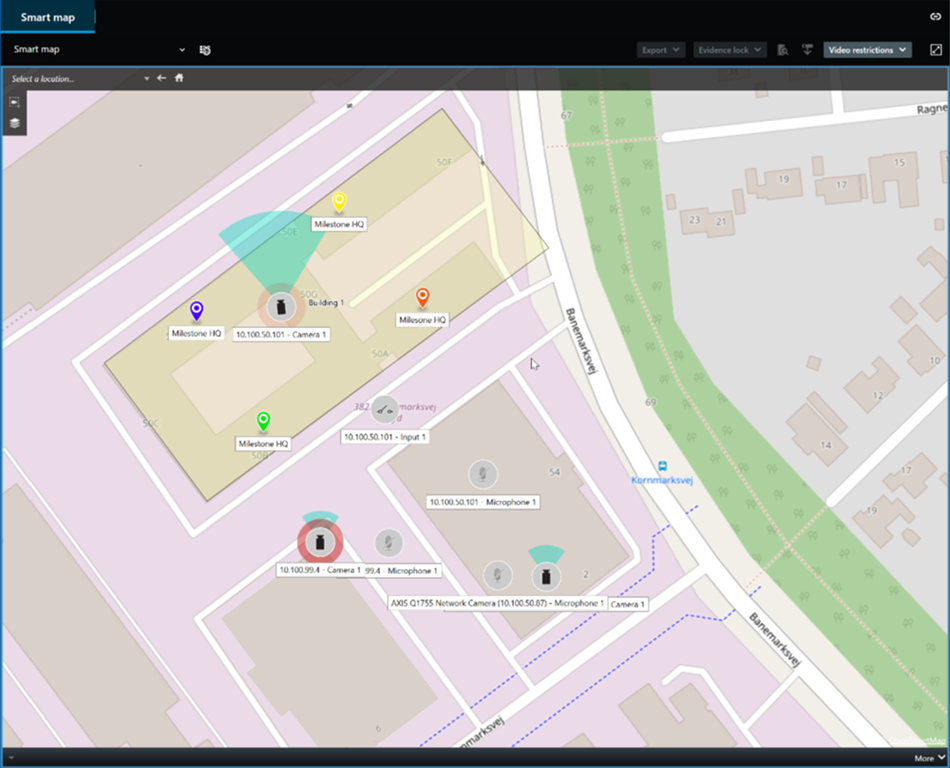
With the two map features, Map and Smart Map, you can visualize the area and buildings you protect and the location of the cameras and other devices added to your XProtect VMS system.
Both map features can highlight cameras or devices when a rule creates an event or alarm associated with the camera or device. With this behavior, you instantly know where the incident has happened, enabling you to respond quickly and relevant to the situation.
Patrolling
Matrix
Hotspot
The hotspot feature is a great situational awareness feature that, based on rules, can share live video of incidents with you.
Exactly when the shared video is shown in a hotspot view item depends entirely on the rules defined by your system administrator.
Compared with the Matrix features, the hotspot feature has the benefit that you can define that the view item with hotspot content shows the video in better quality than the video in the other view items. If you select a view with a large view item for the hotspot content, you and your colleagues can clearly see what is happening in the shared video.
Events and alarms
Rules create events and alarms. This behavior makes you aware of ongoing incidents and enables you to respond more quickly and targeted to the incidents.