Global toolbar
On the global toolbar, in the upper-right corner of the XProtect Smart Client, you have access to information about your XProtect Smart Client and how to change the settings. This includes:
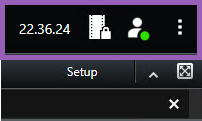
Time zone
Set up time zone. In the Application settings you can choose whether to show or hide the current time and date in the title bar.
Shortcut to evidence lock list
The Evidence lock list shows evidence locks you have created. You can sort, filter, and search the evidence locks list and see detailed information about each evidence lock. See also View evidence locks.
User menu
On your User menu, you can see your Login information, and you can log out from the XProtect Smart Client. See Logging in and out. Login information contains information about the status of the XProtect VMS servers that your XProtect Smart Client is connected to.
Note
A red circle on the User menu  indicates that one or more servers are unavailable.
The number of servers you see reflects the number of servers retrievable from the XProtect VMS system at the time you logged in. Particularly if you connect to large hierarchies of servers, occasionally, more servers can become available after you log in. The server list is a static representation of server status. If a server is unavailable, it will display a reason in the Status field when you select it. To connect to the server, select Load Server. The server status for that server will then be updated. If a server continues to be unavailable for longer periods of time, contact your system administrator for advice.
Available servers are displayed in green.
Unavailable servers are displayed in red. If servers are not available at the time you log in, you can’t use cameras or features belonging to those servers. When you have viewed the status, the red button will stop flashing even if the server is still unavailable.
Select Login information to view the server status.
Settings and more window:
The Settings and more window covers:
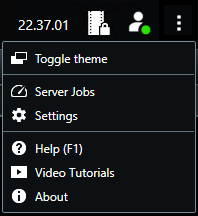
Toggle theme—you can switch the XProtect Smart Client theme to dark or light.
Server jobs—depending on your user permissions to retrieve data from interconnected hardware devices or cameras that support edge storage, you can view the server jobs created for each data retrieval request for these devices. See View all edge retrieval jobs.
Settings—you can configure XProtect Smart Client settings and behavior, joysticks, keyboard shortcuts, language, and more. See also The Settings window.
Help—you can access the help system, play online video tutorials, or view version number and plug-in information.
Video tutorials—opens the Learning Portal.
About—information about the latest XProtect Smart Client plug-ins and versions.