Examine the Device Manager
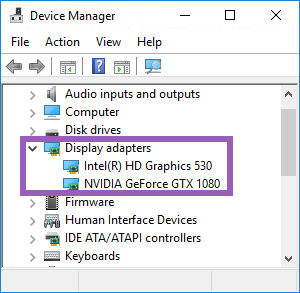
Make sure that an Intel or NVIDIA display adapter is present in Windows Device Manager.
Important
You can connect your displays to any display adapter available. If a more powerful display adapter is available in your computer, typically NVIDIA or AMD®, connect your displays to this adapter to use all available GPU resources for hardware accelerated decoding and rendering.
Important
Not all NVIDIA display adapters supports hardware acceleration. See Check NVIDIA hardware acceleration support.
If the Intel display adapter is not present, enable the Intel display adapter in the BIOS. See Enable the Intel display adapter in the BIOS.