Check available live video streams
To take advantage of adaptive streaming, two or more live video streams with different resolutions must be configured in your camera settings.
Note
The only supported video resolution format for adaptive streaming is 'width x height'. Video resolution formats presented from a camera, such as 720p, mode2, or VGA, are not supported.
Multi-streaming allows multiple streams per device to be configured on the server. If multiple streams are configured and adaptive streaming is enabled, you can select Adaptive streaming or one of the other available streams. Not all cameras support multi-streaming.
To make sure that Adaptive streaming is configured in a view:
Click Setup to configure the view.
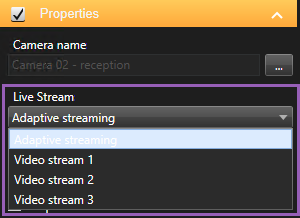
In Properties, click the Live stream dropdown list, and the list of available live video streams appears.
Check if two or more live video streams are available and select Adaptive streaming.
Note
If only one live video stream is available, add more live video streams for the camera in XProtect Management Client.
Click Setup to close the view configuration.
To make sure that Adaptive streaming is selected in a Live view item:
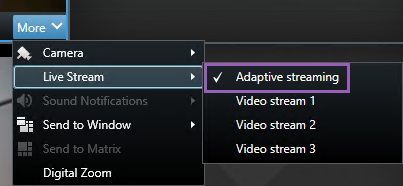
Click the More dropdown list.
Select Live stream, and the list of available live video streams appears.
Check if two or more live video streams are available and select Adaptive streaming.