Milestone XProtect and OnGuard Integration licenses
The customer must have XProtect Access enabled and the appropriate number of doors in their XProtect SLC. See the Management Client license screen for more details.
Note
Starting with version 5.0, the plug-in requires an additional Starting with version 5.0, the plug-in requires an additional MIP license. license.
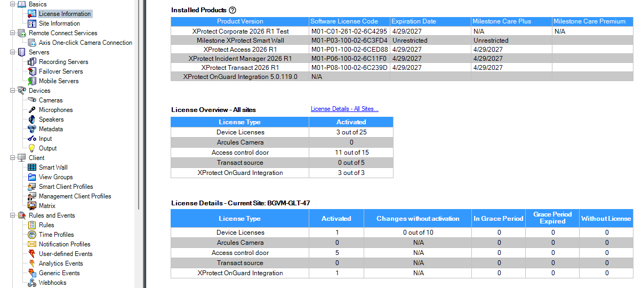
MIP License
This solution has a built-in MIP license check that is locked to the Software License Code (SLC) of the XProtect installation, of which it is a part.
The solution automatically includes a 30-day grace period starting from the date the plug-in is installed. After the grace period expires, a permanent MIP license is required.
Permanent MIP licenses are provided by the distributor. To generate a permanent MIP license, the distributor must know the SLC of the XProtect system where the solution has been installed. Collect the SLC and send it to the distributor, preferably via email.
Once the permanent MIP license is acquired, the XProtect system must be reactivated, either online or offline.
If the MIP license check fails, the XProtect Management Client plug-in will issue error messages and operate with reduced functionality.