Add your XProtect license
After you deploy, you are ready to add the software license (.lic) file to your deployment and activate your license to start using your XProtect product.
To add your XProtect license, connect to your deployment and follow the steps below:
Copy your software license (.lic) file to the Windows desktop of your deployment.
In the Windows notification area, right-click the management server and select Change license....
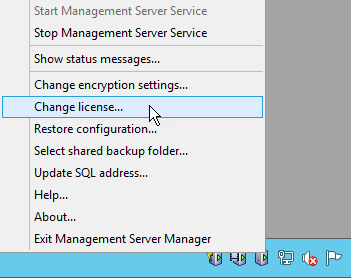
Add the XProtect software license file from the Management Server tray icon.
In the Change XProtect License window, select Import License. Locate the license that you copied in step 1 and select Open.
Select OK.
Your license is now imported into your installation.
Important
You must activate your license to enable the correct XProtect version in your XProtect VMS installation.
After you add your XProtect license to your installation, you must activate the license using XProtect Management Client.