About the nodes in the failover web console
When you log in, you see the control panel. Nodes are the members of the failover cluster. node1 corresponds to the computer you selected as the primary computer, while node2 corresponds to the computer you selected as the secondary computer.
The control panel consists of two columns: state and data synchronization status:
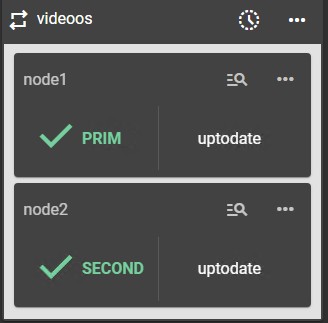
The node state column shows the current state of a node:
Tab | Description |
|---|---|
PRIM | The data replicates from this node. |
SECOND | The data replicates to this node. |
ALONE | No data replication. The node acts as a single unit. |
STOP | The node stopped, and no redundancy is available. |
WAIT | (Transient) The node is starting up (magenta) or waiting for the availability of a resource (red). |
The node data synchronization status column shows a node's current synchronization status.
Important
The column is unavailable when the failover cluster is connected to an external SQL Server.
Tab | Description |
|---|---|
uptodate | The replicated files are up-to-date. |
not uptodate | The replicated files are not up-to-date. |
connection error | Cannot connect to the node. |
not configured | The configuration is missing from the node. |