Use several instances of an event
To be able to specify different properties for different instances of an event, you can add an event more than once.
Note
The following example is specific to cameras.
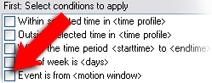
Example: You have configured the camera with two motion windows, called A1, and A2. You have added two instances of the Motion Started (HW) event. In the properties of one instance, you have specified the use of motion window A1. In the properties of the other instance, you have specified the use of motion window A2.
When you use the event in a rule, you can specify that the event should be based on motion detected in a specific motion window for the rule to be triggered: