Installation method
As part of the installation wizard, you must decide which installation method to use. You should base your selection on your organization's needs, but it is very likely that you already decided on the method when you purchased the system.
Options | Description |
|---|---|
Single Computer | Installs all server and client components, as well as SQL Server on the current computer. When the installation completes, you get the possibility to configure your system through a wizard. If you agree to continue, the recording server scans your network for hardware, and you can select which hardware devices to add to your system. The max number of hardware devices that can be added in the configuration wizard depends on your base license. Also, cameras are preconfigured in views, and a default Operator role is created. After installation, XProtect Smart Client opens, and you are ready to use the system. |
Custom | The management server is always selected in the system component list and is always installed, but you can select freely what to install on the current computer among the other server and client components. By default, the recording server is not selected in the component list, but you can change this. You can install the not selected components on other computers afterwards. |
Single Computer installation
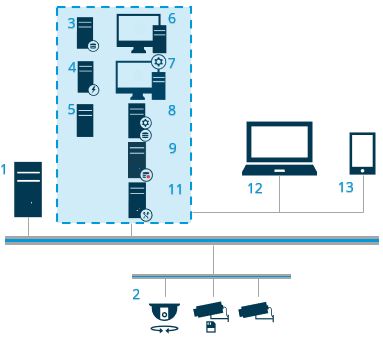
Example of a Single Computer installation.
Typical system components in a system:
Active Directory
Devices
Server with SQL Server
Event server
Log server
XProtect Smart Client
Management Client
Management server
Recording server
Failover recording server
XProtect Mobile server
XProtect Web Client
XProtect Mobile client
XProtect Smart Client with XProtect Smart Wall
Custom installation - example of distributed system components
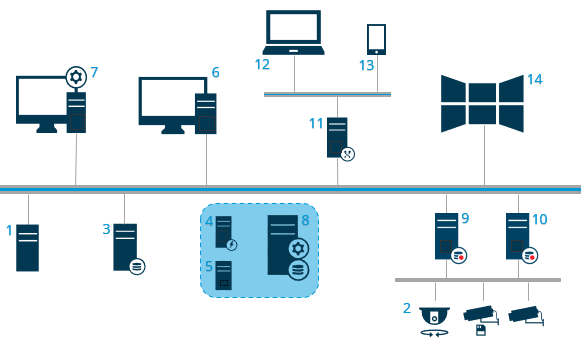
Example of a custom installation with distributed system components.