Enable / disable individual devices
Cameras are by default enabled.
Microphones, speakers, metadata, inputs and outputs are by default disabled.
This means that microphones, speakers, metadata, inputs and outputs must be individually enabled before you can use them in the system. The reason for this is that surveillance systems rely on cameras, whereas the use of microphones and so on is highly individual depending on the needs of each organization.
You can see if devices are enabled or disabled (the examples show an output):
 Disabled
 Enabled
The same method for enabling/disabling is used for cameras, microphones, speakers, metadata, inputs, and outputs.
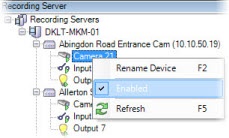
Expand the recording server and the device. Right-click the device you want to enable.
Select Enabled to clear or select it.