Match list properties
Name | Description |
|---|---|
List name | Shows the name of the list. If needed, you can change the name. |
Custom fields | Select to specify which license plate entry columns that you or the client user can add additional information to. See Edit match lists. |
Search | Search the match list for any list item. If needed, you can use ? as a single wildcard |
Add | Select to add a license plate registration number or an alias to the match list. When you're adding license plate registration numbers:
Examples: ABC123 (correct), ABC 123 (incorrect), abc123 (incorrect)
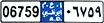
Examples: ?????A, A?????, ???1??, 22??33, A?B?C? and similar. Some regional areas might have exceptions to these rules. For example, personalized plates with spaces. Plates with two sets of characters which must be recognized separately by an underscore character ( _ ). Or plates from certain regions with letters on a different background color on parts of the license plate. Example: |
Edit | Make edits to properties of custom fields. |
Delete | Click to delete the selected license plate number. |
Import | Click to import license plate registration numbers from any comma-separated file, for example a .txt-file or .csv-file (see Import and export match lists). |
Export | Click to export the list of license plate registration numbers to a comma-separated file, for example a .txt-file or .csv-file. |
Rows per page | Select how many list items to display in one page (one screen). You can choose between 50 and 1000 rows. |
Events triggered by list match | Select which event(s) should be triggered by a list match. You can choose between all available types of events defined in your system. |