BriefCam on Amazon Web Services (AWS) white paper
This white paper presents the recommended deployment architecture for BriefCam in the AWS (Amazon Web Services) cloud. The deployment strategy relies on IAAS (Infrastructure-as-a-Service), which means using standard infrastructure components in the AWS public cloud (compute, network, and storage).
Recommended Architecture
The architecture below presents an example deployment of a distributed version of BriefCam in AWS. You can use this diagram as a baseline to plan your specific AWS architecture, considering your system sizing and cost considerations.
This example distributes BriefCam’s components to separate EC2 instances (VS Server, Fetching, Processing, and so on). In smaller scale systems, some of these components can reside on the same EC2 instance. To plan the right architecture that meets your performance requirements, contact your sales manager or BriefCam’s support.
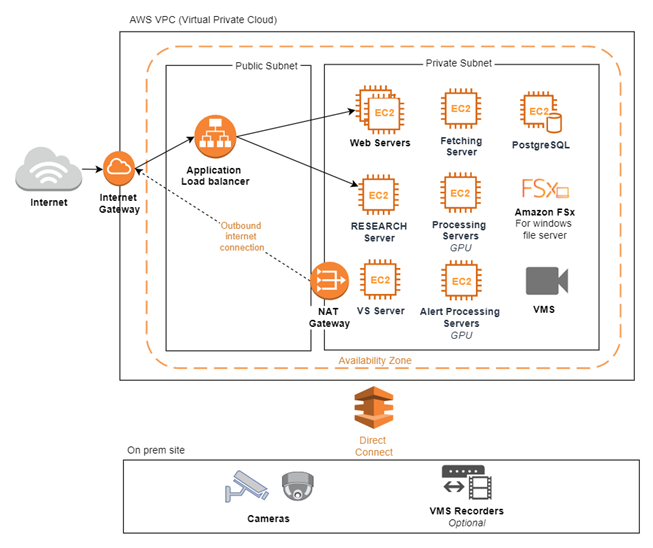
Connecting the AWS Cloud with Your On-premises Data Center
Video analytics platforms require a reliable stream of video to be transferred to the public cloud. Relying on public internet infrastructure is risky and can result in poor performance due to unpredictable latency and network fluctuations.
To solve this challenge, AWS provides the AWS Direct Connect service, which allows you to connect your on-premises data center to the AWS cloud using a direct connection into the AWS backbone network, bypassing the internet service provider.
It is highly recommended to use this service, and crucial if you plan on using real-time video processing.
If required, you can configure a VPN tunnel between your data center and AWS.
Port Forwarding
If the user is behind a firewall, proper port forwarding needs to be done on the customer site. This will allow connectivity from an AWS machine to a machine behind a firewall (and vice-versa). The steps that need to be done are different for each type of firewall.
Virtual Network Infrastructure
The following describe in detail the recommended AWS components.
AWS VPC (Virtual Private Cloud) – An isolated virtual network that will host all BriefCam’s infrastructure.
The VPC resides in one of AWS’s regions and data centers (availability zones). For optimal performance, make sure to choose the availability zone that is closest to your on-prem data center.
Click this link to see AWS’s list of availability zones: https://aws.amazon.com/about-aws/global-infrastructure/regions_az/.
Internet Gateway – An internet gateway allows communication between your VPC and the internet.
Subnets – The recommended network architecture separates BriefCam to public and private subnets (as presented in the above diagram). All of the incoming traffic goes through an Application Load Balancer, and all of the outgoing traffic goes through the NAT Gateway.
NAT Gateway – If you decide to use a private subnet, you may optionally deploy a NAT gateway to allow outbound internet communication from your private subnet.
Application Load Balancer – An ALB is highly advised from both a security aspect and scalability. Configure your ALB to handle HTTPS encryption and add a WAF (Web Application Firewall) to restrict incoming traffic to your BriefCam environment. The ALB can distribute traffic to multiple instances of BriefCam’s web services or RESEARCH as needed.
Compute Infrastructure
BriefCam’s compute instances can be separated into:
GPU-based instances – Windows 2019 Servers with NVIDIA GPUs.
You can use one of the g4dn servers, based on your environment sizing considerations.
Type | GPU | GPU Spec | vCPUs | Memory (GB) | GPU Memory |
g4dn.xlarge | 1 | NVIDIA T4 Tensor Core GPUs | 4 | 16 | 16 |
g4dn.2xlarge | 1 | NVIDIA T4 Tensor Core GPUs | 8 | 32 | 16 |
g4dn.4xlarge | 1 | NVIDIA T4 Tensor Core GPUs | 16 | 64 | 16 |
g4dn.8xlarge | 1 | NVIDIA T4 Tensor Core GPUs | 32 | 128 | 16 |
Regular instances – For the VS Server, PostgreSQL, fetching and for instances that do not require a GPU, you can select one of the general-purpose Windows 2019 Servers that match BriefCam’s hardware sizing requirements.
Optionally, it is recommended to use memory optimized instances to achieve improved performance.
All your instances must be associated with persistent HDD/SSD disks, as defined in your sizing document.
Storage
For a shared file storage you can use one of the following two solutions:
Amazon FSx – Amazon FSx for Windows File Server provides fully managed, highly reliable, and scalable file storage that is accessible over the industry-standard Server Message Block (SMB) protocol. Read more at: https://aws.amazon.com/fsx/windows/.
A mounted SSD disk connected to one of your instances and shared in your VPC. The shared folder needs to be accessible by all BriefCam servers.
Amazon FSx can provide better redundancy, and it is recommended if your BriefCam deployment is considered mission critical.