BriefCam VMS Integration Plugin Installation
VMS plugin installations are available for BriefCam Protect, Insights, and Rapid Review.
You can install one or more VMS-specific BriefCam integration plugins to subsequently enable the BriefCam Server to connect to one more VMS environment (multiple simultaneous integrations are supported). The VMS integration Plugin Installation, as well as the VMS SDK (for relevant VMSs) is required to be installed on every machine on which the BriefCam server/On-Demand processing server/Real-Time processing server is installed.
Plugins are available for selected VMS systems (refer to: Supported VMSs). Each installed plug-in will be embedded on the BriefCam Server for subsequent selection within the BriefCam Server Admin application. For more information, see Camera and VMS Configuration.
The VMS plug-in installations will deploy the required prerequisites as needed per plug-in.
To install the plug-ins:
Run the VMS Integration Plugin Installation on the BriefCam Server by right-clicking on the
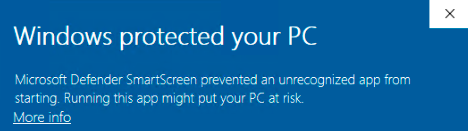
BriefCam<VMS_name>Plugin_<Version_number>.exefile and selecting Run as administrator.If you are using the latest Windows Update and a Windows Defender alert appears, click the More info link and click Run anyway.
The VMS integration Plugin Installation is required to be installed on every machine on which the BriefCam Server/On-Demand processing server is installed.
Read and accept the License Agreement terms.
Select the path to the plugin installation directory. The path should be the same directory as the BriefCam Server directory.
By default, it is set to
C:\Program Files\BriefCam\BriefCam Server\.Click Install and continue as instructed by following the installation procedure.
General VMS Known Issue
RTSP-based integrations do not work when user’s credentials include special characters, such as @ and #.