Density Control
Density is the number of events shown concurrently when playing a VIDEO SYNOPSIS®.
To adjust the event density:
Click the More video options icon (
 ).
).Click the density control (
 ).
).Slide up or down to increase or decrease the number of events shown at once.
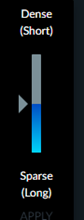
Increasing density will make the VIDEO SYNOPSIS® shorter, whereas decreasing it will make the video longer. The adjusted run time will be presented in the playtime progress bar and reflected in the number of chapters (for example, 36 in the image below is the number of chapters).

The density setting is not persistent; it is applicable only for the current VIDEO SYNOPSIS®. Opening another VIDEO SYNOPSIS® or another case will set the default density.