Creating a Rule with Proximity
You can create a rule that will issue an alert when the distance between people is less or more than a predefined threshold(s). Only people that appear concurrently in the scene are considered.
Alerts with Proximity are available for Smart alerts only.
Note that an alert will be sent once per group of people.
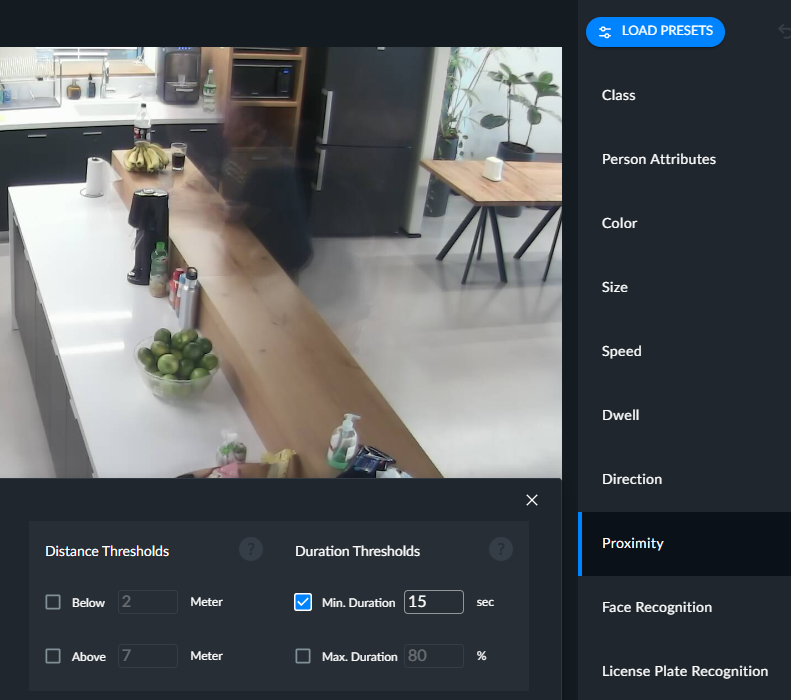
The Below and Above fields are independent of each other and they will be activated (if they have an input in them) or deactivated via the checkboxes. If you select both, alerts will be triggered for people that were below the distance set in the Below threshold and also for people that passed the distance in the Above threshold.
If you also define a Min. duration threshold, an alert will be triggered when the distance between people has been less (or more) than the predefined threshold(s) for longer than the time selected in the Min. duration threshold.
If you include a Max. duration threshold, an alert will be triggered only when there are pairs of people that were closer (or farther) than the predefined distance threshold for shorter than the defined percentage of the track. Objects that were closer/farther than the distance thresholds for longer than the Max. duration threshold will not trigger an alert.
The duration percentage will be calculated by the duration of the violation divided by the longest duration in the scene of one member of the offending couple. For example, if person A is in the scene for 1 minute, and then person B joins person A and is in violation with that person for another minute, the duration percentage of the violation between A and B is 50%.
The Duration thresholds will relate to the aggregate duration (the total time that the distance was below the threshold, even if there were times in between that the distance was farther than the threshold before going back to being closer).
The Proximity filter can be used together with any of the other filters (except for the License Plate Recognition and Count filters).
When another filter is used in conjunction with the Proximity filter, BriefCam will detect proximities where at least one of the people match the other filters. For example, if you select the Proximity filter and red upper wear, BriefCam will look for groups (of 2 or more) in proximity where at least one person is wearing a red shirt (not necessarily the person who will appear in the alert thumbnail). When using a Scene filter (Area, Path, or Line Crossing) with the Proximity filter, the proximity events are not limited to people detected in the Scene filter. BriefCam will take all the people who triggered the Scene filter and see if they were in proximity with other people anywhere in the entire scene.