Adding Dimensions
Dimensions determine how the data in a visualization are grouped (this often refers to time, class, etc.).
Click Edit sheet
 to see the Master items.
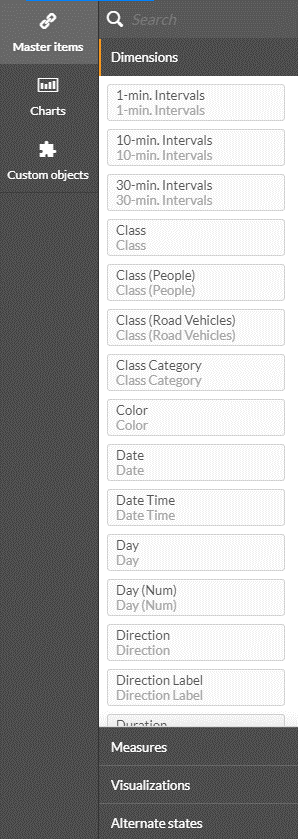
See also: Creating a Customized Dimension or Measure
The table below provides a brief description of each of the dimensions available:
Dimension Name | Description | Sample values |
1-min. Intervals | Groups of the data in 1-minute time intervals | 02:10, 02:11, 02:12 |
5-min. Intervals | Groups of the data in 5-minute time intervals | 04:10, 04:15, 04:20 |
10-min. Intervals | Groups of the data in 10-minute time intervals. People counting has its own dimension for this functionality. | 03:10, 03:20, 03:30 |
15-min. Intervals | Groups of the data in 15-minute time intervals. People counting has its own dimension for this functionality. | 05:00, 05:15, 05:30 |
30-min. Intervals | Groups of the data in 30-minute time intervals. People counting has its own dimension for this functionality. | 04:00, 04:30, 05:00 |
Class | Object class | Man, Woman, Car, Truck |
Class (People) | Only “People” object classes, meaning: Man, Woman and Child | Man, Woman, Child |
Class (Road Vehicles) | Only “Road Vehicles” object classes, meaning: Motorcycle, Car, Pickup Truck, Van, Truck, Bus | Motorcycle, Car, Pickup Truck, Van, Truck, Bus |
Class Category | Contains the following class categories:
| People, Bicycles, Road Vehicles, Other Vehicles, Animals |
Color | Object main color | Black, Green, Orange |
Custom Dimensions | Custom dimension name (as configured in the Sources module). This includes the Path, Area, and Line Crossing filters. For people counting, use the People Counting: Area dimension. | Shoes, Accessories, North, East |
Date | Object date. People counting has its own dimension for this functionality. | 19/03/2018 |
Date Time | Object date time. People counting has its own dimension for this functionality. | 19/03/2018 13:03 |
Day | Object day. People counting has its own dimension for this functionality. | Mon, Tue, Wed |
Day (Num) | Object day number (for example, 19 if the date is 19/03/2018). People counting has its own dimension for this functionality. | 1,2,15,17,19 |
Direction | Object direction in degrees | 18º, 45º |
Direction Label | Object general direction:
| Up, Right, Down, Left |
Duration | Object duration in seconds, calculated as the difference between Object start time and Object end time in the frame | 0:00:02 |
Dwell (Sec) | Objects having dwelled for a user-specified period of time or more, in seconds | 11, 21 |
Face Mask | Object’s Face Mask classification: Mask, No Mask or Unknown. | Mask, No Mask, Unknown |
Handheld Bag | Object’s Handheld classification: Handheld Bag, No Handheld Bag or Unknown | Handheld Bag, No Handheld Bag or Unknown |
Hour | Object time in hour range format. People counting has its own dimension for this functionality. | 04:00-05:00, 21:00-22:00 |
Hour (hh) | Object time in hour format. People counting has its own dimension for this functionality. | 06:00 |
Hour (Num) | Object time in hour number format. People counting has its own dimension for this functionality. | 16, 21 |
License Plates | Objects detected as license plates | 6DN3168, 1049189 |
Make | Object's vehicle make | |
Make & Model Drill Down | Drill down from vehicle to make to model. Note that all cars may not have Make & Model in the RESEARCH module. This is because Make & Model is only presented when the Make and the Model are consistent with each other. If the engine generates a Make & Model that is inconsistent (such as Honda Highlander) it will not be saved into the database. | |
Model | Object’s vehicle model | |
Month | Object time in month format. People counting has its own dimension for this functionality. | Mar, Apr |
Month (Num) | Object time in month number format. People counting has its own dimension for this functionality. | 3, 4 |
Object End Time | Object end time in the frame | 19/03/2018 13:04:11 |
Object Start Time | Object start time in the frame | 19/03/2018 13:00:02 |
People Counting has separate filters, dimensions and measures. People Counting data will not be seen together with other objects’ data. For example, if you filter on a specific date it will not affect the data of the people counting.
People Counting: 10-min. Intervals | Groups of the data in 10-minute time intervals for people counting | 03:10, 03:20, 03:30 |
People Counting: 15-min. Intervals | Groups of the data in 15-minute time intervals for people counting | 05:00, 05:15, 05:30 |
People Counting: 30-min. Intervals | Groups of the data in 30-minute time intervals for people counting | 04:00, 04:30, 05:00 |
People Counting: Area | Custom area dimension name (as configured in the Sources module) for people counting | Shoes, Accessories, North, East |
People Counting: Date | Date that people were counted | 19/03/2018 |
People Counting: Date Time | Date and time that people were counted | 19/03/2018 13:03 |
People Counting: Day | Day of the week that people were counted | Mon, Tue, Wed |
People Counting: Day (Num) | Number of the day that people were counted (for example, 19 if the date is 19/03/2018) | 1,2,15,17,19 |
People Counting: Hour | Time, in hour range format, that people were counted | 04:00-05:00, 21:00-22:00 |
People Counting: Hour (hh) | Time, in hour format, that people were counted | 06:00 |
People Counting: Hour (Num) | Time, in hour number format, that people were counted | 16, 21 |
People Counting: Month | Time, in month format, that people were counted | Mar, Apr |
People Counting: Month (Num) | Time, in month number format, that people were counted | 3, 4 |
People Counting: Source | Source name (as configured in the Sources tab) for people counting | Airport, Floor A |
People Counting: Time Drill Down-Time | Time drill down within object visualization for people counting, according to: Date, Hour, 30-min, 10-min | |
People Counting: Week # | Time, in week number format, that people were counted | 9, 14, 20 |
Site dimensions | Values from the Hub’s SITES tab, including Site Address, Site City, Site Country, Site Name, Site Phone Number, Site State, Site Status, and Site Type. These are only available on Hub machines. | |
Size | Object size in meters or feet (as per user settings) | 1.8, 0.5 |
Source | Source name (as configured in the Sources tab). People counting has its own dimension for this functionality. | Airport, Floor A |
Source Group | Source Group name (as configured in the Source Group tab). Only groups that are active in the UI will appear. | First floor, ATM machines |
Source Group Watchlist | The name of the external watchlists associated with a Source Group. | VIPs, Employees |
Speed | Object speed in km/hour or miles/hour (as per user settings) | 10, 78, 111 |
Time Drill Down | Time drill down within object visualization, according to: Date, Hour, 30-min, 10-min, 5-min, 1-min. People counting has its own dimension for this functionality. | |
Tolerance | This dimension is currently not supported. Allows users to select the threshold of the object quality included in the dashboard. The threshold impacts the detection sensitivity: Loose, Normal, Strict. For example, Loose tolerance might include in the dashboard, items that are not detected as objects, such as shadows and lighting. Note that this dimension does not affect the tolerance of the Custom Dimensions, which can be set when editing the Custom Dimension and will be applicable from the time it was set. | Loose, Normal, Strict |
Watchlist Identity | The identity name within a watchlist. This is only available if this face is related to an external watchlist. | Sam, Margaret |
Week # | Object time in week number format. People counting has its own dimension for this functionality. | 9, 14, 20 |