Why am I getting the Client failed to connect to the websocket server error?

WebSockets provide a connection between the client and the server.
To resolve this issue:
Check that the Notification service and all other services are running. For additional information, see the Basic Troubleshooting section.
From the Task Manager, check if the NotificationService.exe is running. If it is running, go to the BriefCam Administrator Console and stop the Notification service. Then go back to the Task Manager, if the NotificationService.exe is still there, right-click on the service, click End Process Tree, and restart the service from the BriefCam Administrator Console. This step is done because there may have been another NotificationService.exe instance running in the background.
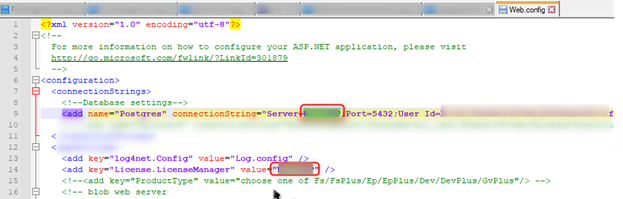
In both Web config files (
C:\Program Files\BriefCam\WebServices\ProWebApi\webConfigandC:\Program Files\BriefCam\WebServices\AdminApi\web.config), check that the server name is defined correctly (in theconnectionString="Server=row) and in the BriefCam Administrator Console's clientNotificationEndPoint environment setting.