

Create dedicated user accounts on each device
All cameras have a default user account with a user name and password that the VMS uses to access the device. For auditing purposes, Milestone recommends that you change the default user name and password.
Create a user account specifically for use by the VMS, and use this user account and password when you add the camera to the VMS. When a recording server connects to the camera, it uses the user name and password you have created. If the camera has a log, this log shows that the recording server has connected to the camera.
With a dedicated user name and password, the device logs can help you determine whether a recording server or a person accessed the camera. This is relevant when investigating potential security issues affecting devices.
You can change the user name and password for a device before or after you add it in Management Client.
To change the user name and password before you add the device, follow these steps:
- Go to the device’s web interface, and change the default user name and password.
- In Management Client, add the device, and specify the user name and password.
To change the user name and passwords of devices that are already added, follow these steps:
- In Management Client, in the Site Navigation pane, expand the Servers node and select Recording Servers.
- In the Recording Server pane, expand the recording server that contains the device, and then right-click the device and select Edit hardware.
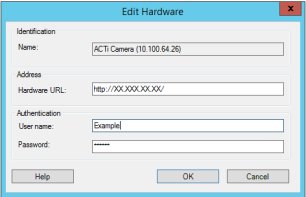
- Under Authentication, enter the new user name and password.
Learn more
The following control(s) provide additional guidance:
- NIST SP 800-53 AC-2 Account Management
- NIST SP 800-53 AC-4 Least Privilege
Was this article helpful?
Thanks for your feedback!